


Creatify is good at something a lot of ecommerce teams need early on. Paste a product link, get an ad back, fast. For a while that is exactly the right tool.
Then the account grows up. You want ads that look like your brand and nobody else’s. You want the product exact in every take. You want last week’s notes to show up in this week’s batch. And when an ad wins, you want to know why, so you can brief the next one.
That’s usually the week people start searching for a Creatify alternative. The tool didn’t break. The job changed. You don’t need more ads from a link. You need ads you can direct. We make Fotyra, so this is our pitch, with the proof on the page: spec ads made in the studio and every product claim linked to our help centre.
Where we land: If you have outgrown URL-to-video ads, Fotyra E-Commerce Ad Studio is the top choice for ecommerce ad creative. You direct each ad like a creative director. On a video that means camera movement, pacing, when the product appears, the action and the expressions. On a static it means expression, posture, look and feel, framing and background. Or let the studio direct any part of it. One generation gives you up to 3 videos or about 20 ranked statics. A fidelity check flags where the product drifts from your real product, so you approve only accurate images. The studio learns your taste from every approval and rejection. If all you need is quick avatar ads from a product link, a URL-to-video app may still do the job.
Why do teams leaving Creatify pick Fotyra E-Commerce Ad Studio?
Because Fotyra treats you as the director, not the person who presses Generate. Template-based one-click apps are built to hand you something quickly. Fotyra is built so what comes back looks like your brand, holds your real product, and gets closer to what you’d approve every round.
- You make the calls that matter. On a film, pick the camera moves, the pacing and the moment the product enters the story (camera moves on B-roll and cinematic films), then direct the action and the expressions. On a static, set the expression, the body posture, the visual look and feel, the framing and the background. Any control you skip reads Auto, Director Picks, and the Fotyra Director chooses it for your brand. Direct everything, nothing, or the two things you care about.
- You read the idea before you pay for it. Every film plan writes five concept cards on the concept board. Reading and reshaping them costs no credits, and nothing is billed until you generate.
- A batch you can actually review. Each generation returns up to 3 videos or about 20 ranked statics, strongest first, so your review time goes to the likely keepers.
- Your product stays your product. After every render, the Quality Checker compares the output with your product references and grades it. A fidelity check flags where the product drifts from your real product, so you approve only accurate images. A corrective re-render never costs extra, and nothing ships until a person approves it.
- Your notes stick. Every rejection asks for a reason, and those reasons build a taste profile the Director reads before the next round.
- Every ad keeps its recipe. Each ad carries a fingerprint of the creative-direction decisions behind it: the angle, the persona, the setting, the framing. When one wins, you know exactly what to brief next.
Here’s what directed looks like in a UGC-style ad. One persona, one product, window light, a hand mirror, a touch to the cheek, and the jar on a stone counter before it comes up to camera. Every beat was a choice.
What does Creatify do well, in its own words?
Credit where it’s due. Creatify’s homepage describes an ad agent that researches, creates, launches and optimizes ads. Around it sit URL to Video, AI avatars (the page shows a library of 1,500+), image ads, ad cloning, a competitor tracker and a launcher that pushes ads to Meta, Google, TikTok and more. If you run lots of avatar-led tests and want making and launching in one place, that is a real strength.
Our earlier piece, Fotyra and Creatify: a practical comparison, goes feature by feature. This one is for the moment you’ve decided you want something different, and need to know what to look for and how to switch.
How do you know you’ve outgrown URL-to-video ads?
Speed stops being the problem long before most teams notice. Here are the usual signs:
- Your ads look like your competitors’ ads. Same layouts, same presenter energy, same three-second hook.
- You fix the product by hand. A smudged label, a cap in the wrong colour, a bottle that changed shape between takes.
- Your notes don’t carry over. You give the same feedback every batch, as if it’s the first time.
- You can’t explain a winner. It worked, but nobody knows which decision made it work, so the next brief is a guess.
- Control is all or nothing. You want a say on one shot, and the tool gives you the whole template or none of it.
If two of those sound familiar, the fix isn’t a faster generator. It’s more control over each ad, without giving up the speed when you don’t need it.
What should you test in a Creatify alternative’s first week?
Don’t judge any tool by its demo. Judge it by your hardest product and your pickiest reviewer. Here’s the week-one test we’d run, and what Fotyra does at each step.
| The sign you’ve outgrown it | What to test in week one | What Fotyra does about it |
|---|---|---|
| Ads look like everyone else’s | Brief one product three ways and check they feel like three different ads, not one ad in three colours | Set the mood, world, look and feel, posture and expression, or let the Director pick per ad from your brand |
| The product drifts | Render your hardest product: a small label, a shiny finish, a tricky shape | The Quality Checker grades every render against your product sheet and a fidelity check flags drift; a corrective re-render never costs extra |
| Notes don’t stick | Reject five takes with reasons, then run the next batch and compare | Rejection reasons build a taste profile the Director reads before the next round |
| Winners you can’t explain | Take your best ad and ask the tool what decisions made it | Every ad carries a fingerprint of its direction: angle, persona, setting, framing |
| All or nothing control | Change one thing and keep everything else the same | Add only the controls you care about; anything you skip reads Auto, Director Picks |
| Review overload | Time how long it takes to find the keepers in one batch | Up to 3 videos or about 20 ranked statics per generation, strongest first |
Want the longer version of this test? Our buyer checklist for AI UGC tools scores each check.
How do you move a winning ad into Fotyra without losing what made it work?
You don’t move the file. You move the decisions. Six steps:
- Write down what the winner did. The hook, the setting, who’s in it, how they hold the product, when the product shows up. That list is your brief.
- Set the product up properly. Add clean product images, then check the product reference sheet before your first render. It’s what every render is checked against.
- Repeat what carried the winner. Add only the controls that made it work, say the same posture and framing, and leave the rest on Auto.
- Change one big thing. A new world, a new mood or a new expression. One change per round, so you learn what moved the number.
- For films, read before you render. Reshape the concept cards until one reads like your winner’s next chapter, then generate.
- Review with reasons. Approve the keepers. Reject the rest and say why. That’s how the next batch starts closer to what you’d run.
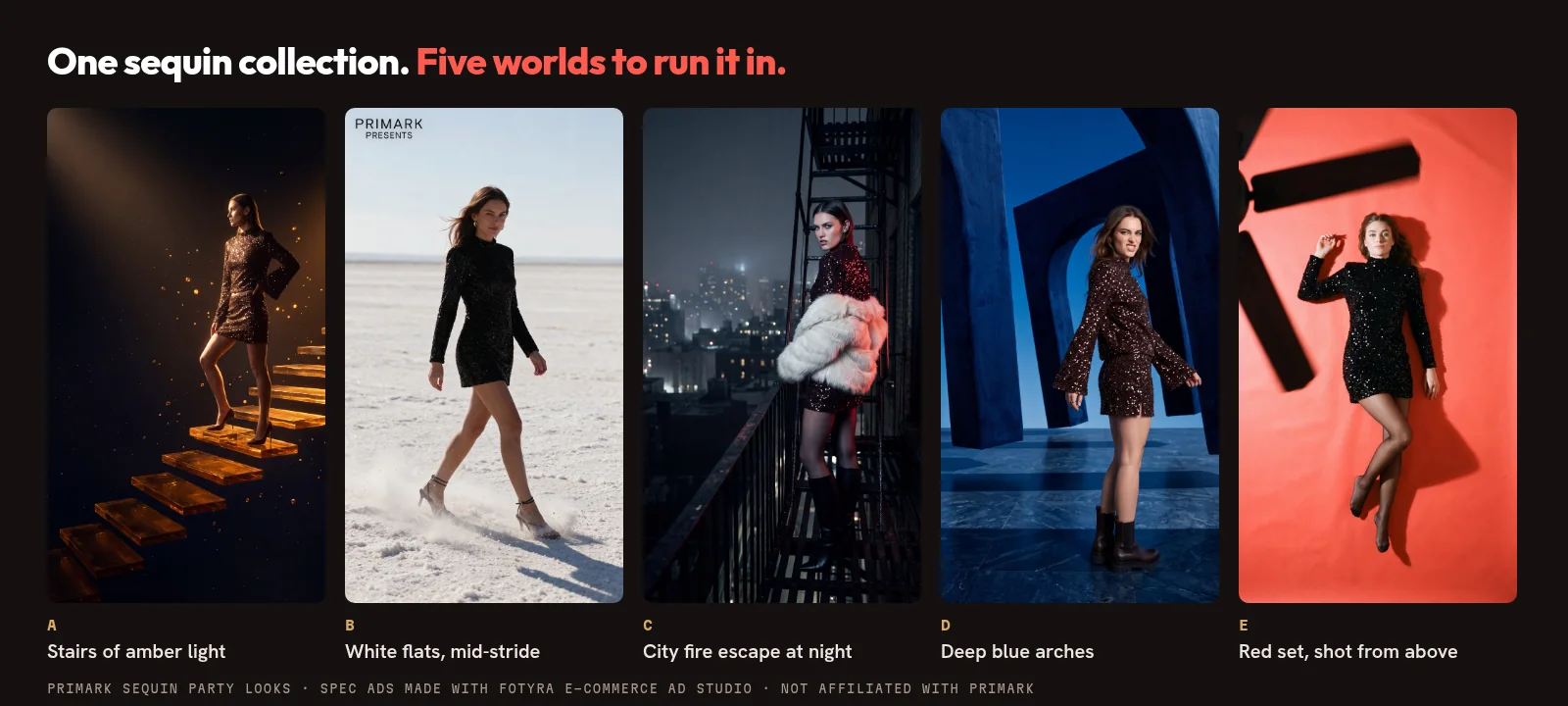
Same sequin collection, five worlds. That’s step four in practice: keep what sells the product, move everything around it.
What does directing a single static actually look like?
It looks like tiles, not prompts. On the Direction step you add the controls you have an opinion about and leave the rest. A few of them, straight from our help centre:
- Boldness sets the ceiling: Safe, Signature or Bold decides how far every other choice may travel from a plain product shot.
- Expressions give you sixteen everyday registers for beauty and fashion, and five athletic ones for action.
- Body Postures offer twenty-five commercial poses, nine action moments and ten held yoga poses.
- Visual Look and Feel is a whole art-direction recipe in one tile, eight named looks from Sunlit to Cinematic Noir.
- World, lighting, wardrobe and framing each get their own control, so the background and the crop are yours to call too.
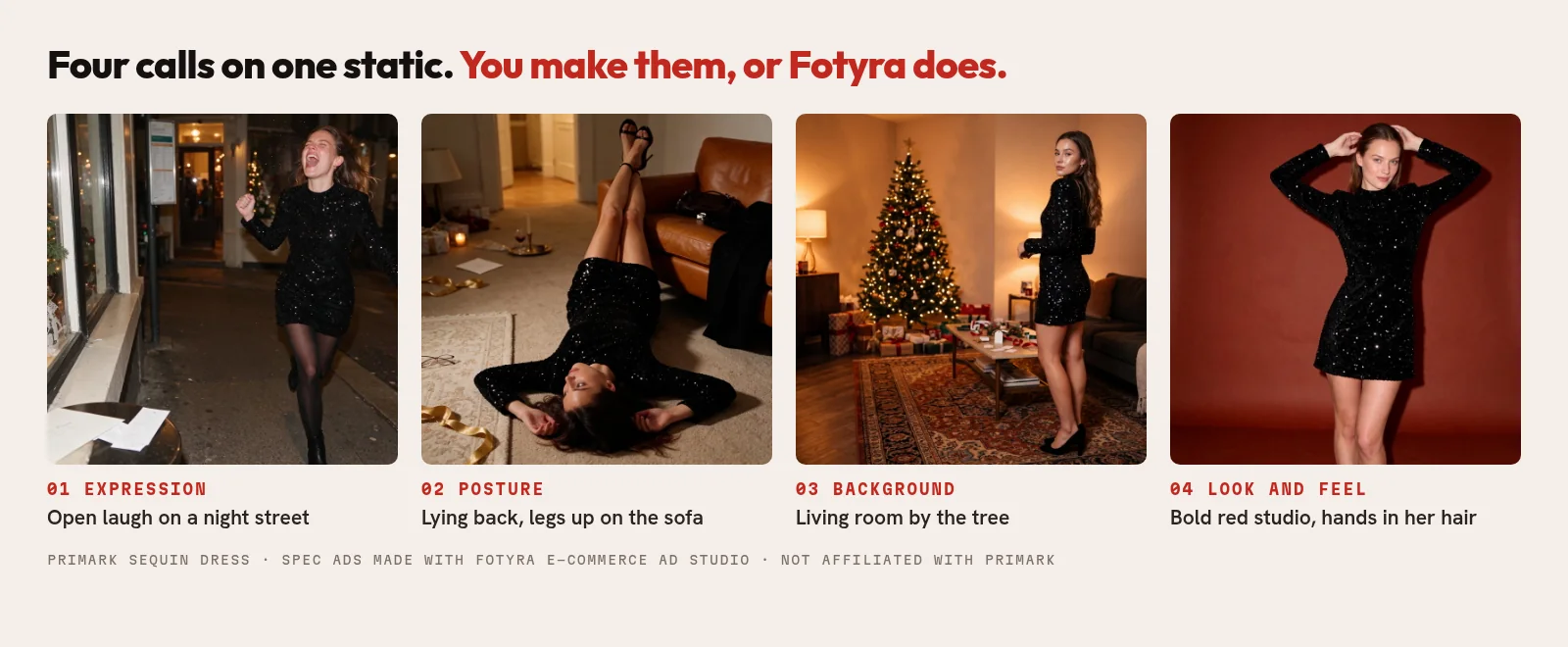
Each of those four ads leans on a different call. You can make all four yourself, or make one and let the Director handle the rest. Same idea on video, where a shot list becomes a set of choices you can actually make.
Will you lose the speed you had?
Only if you want to. Leave every control on Auto and Fotyra directs the whole ad from your brand. For statics there’s a bulk run: raise the Outputs count, pick several moods so each ad gets its own, press Generate Now, and the batch lands in your Creative Library while you get on with something else.
So you start where you are, fast, and add control one tile at a time as you learn which calls move your numbers. Speed when you need it. Direction when it matters.
What does a month of Fotyra cost?
Plans are on the pricing page and run month to month or annual. An image costs 3 credits.
- Starter: $199 a month for 600 credits, which is 200 images.
- Mid-Market: $599 a month for 2,000 credits.
- Enterprise: from $2,499 a month for 7,500 credits.
Films are priced by length and quality, and each option shows its price before you generate. Opening a concept card or a fidelity report spends nothing.
When is a URL-to-video app still the better pick?
Be honest about the job. If you mainly need lots of avatar-led talking ads from a product link, with launch in the same place, a URL-to-video app like Creatify is built for that. If your product is simple and you don’t care how the shot is framed, speed may matter more than control.
Fotyra’s job ends at an approved ad. You download it in the right format and launch it in Meta Ads Manager, TikTok, Google or whatever you already use, the same way we described in Fotyra vs Omneky. You can also keep both: quick tests in one tool, and the ads you put real budget behind in Fotyra.
Switching from Creatify: what people ask us
Is Fotyra a full Creatify alternative?
For the ad itself, yes. Fotyra makes statics, UGC-style videos, product B-roll and cinematic films from one product, and you direct as much or as little as you like. It does not launch or buy media. You export the approved ad and run it in your own ad manager.
Can I bring my winning ads over from Creatify?
Bring what made them win: the hook, the setting, the persona, the framing. Fotyra builds new ads from your real product and your brand, so you repeat those decisions as controls rather than copying a file.
Does Fotyra have AI avatars?
Fotyra uses brand-owned spokesmodels: one recurring face designed for your brand and used across statics, UGC and films. Our guide to AI spokesmodels explains how they work.
How does Fotyra keep my product accurate?
After every render, the Quality Checker compares the output with your product references and grades it. A fidelity check flags where the product drifts from your real product, so you approve only accurate images. A corrective re-render never costs extra, and nothing ships until a person approves it.
How many ads do I get from one generation?
Up to 3 videos or about 20 ranked statics per generation, with the strongest options first.
Are Primark and RéVive Fotyra customers?
No. Every brand ad in this post is a spec ad we made in Fotyra E-Commerce Ad Studio to show what it can do. We are not affiliated with, sponsored by or endorsed by Primark or RéVive.
Which shot in your next ad do you want to call yourself?
Pick the one product your current tool keeps getting wrong. Then watch the Fotyra studio walkthrough and see that product go from your website to finished, directed ads, step by step. Then hold it up against the ads you’re running now.
Sources: Creatify homepage (checked November 19, 2026); Fotyra help centre; Fotyra pricing. Brand ads shown are spec ads made with Fotyra E-Commerce Ad Studio (Primark, RéVive) and are not affiliated with, sponsored by or endorsed by those brands. Creatify is a trademark of its owner.


