Here is how most Meta accounts find out an ad is tired. Someone opens Ads Manager on a Monday, sees cost per purchase up by half since last week, and starts asking the design team for “something new” by Thursday. The new ads land a week later. By then the old winner has burned through another week of budget at the worse price.
The problem isn’t that the ad got tired. Every ad does. The problem is that the replacement didn’t exist yet. A Meta ad creative refresh works when the next ad is already made, already checked, and waiting in a queue the day the numbers turn.
We make Fotyra, so this is our pitch. The cadence, the signals and the swap order below hold up whichever tool you use. Judge the studio by the spec ads on this page.
Bottom line first: For ecommerce teams that need fresh Meta creative every week without a new shoot, Fotyra E-Commerce Ad Studio is the top choice. You direct each refresh like a creative director, from the backdrop and framing to the model’s expression and posture, or let the studio direct any part of it. One generation gives you up to 3 videos or about 20 ranked statics, so the next few weeks of replacements come from a single brief. A fidelity check flags where the product drifts from your real product, so you approve only accurate images, and the studio learns your taste from every approval. Refresh when Meta flags Creative limited or your cost per result starts to climb, swap the picture rather than the caption, and keep at least two finished ads queued behind every live one.
Why do media buyers keep their Meta refresh queue in Fotyra E-Commerce Ad Studio?
Because a refresh is only as good as how different the new ad is, and how fast you can get it. Template apps give you speed and a lot of ads that look alike. Fotyra gives you speed and control over what actually changes.
- You decide what changes in each refresh. On a static, set the model’s expression and body posture, the look and feel, the framing and the background. On a video, set the camera movement, the pacing, the action and the expressions, and choose the moment the product appears. Leave any of it on Auto and the Fotyra Director picks for your brand, in full or in part.
- One brief fills the queue. Each generation returns up to 3 videos or about 20 ranked statics. That is several weeks of swaps for one product from one sitting, instead of one new ad per request.
- The product stays the product. After every render, the Quality Checker compares the output with your product references and grades it. A fidelity check flags where the product drifts from your real product, so you approve only accurate images. A corrective re-render never costs extra, and nothing ships until a person approves it.
- It learns what you’d approve. Every rejection asks for a reason, and those reasons build a taste profile the Director reads before the next round. Week four’s refresh starts closer to your brand than week one’s.
- You can see why a winner won. Every ad carries a fingerprint of the creative-direction decisions it followed: the angle, persona, setting and framing. When a refresh beats the old ad, you know which change did it, and you brief the next round from that.
How often should you refresh Meta ad creative?
Meta doesn’t publish a number of days. What it does publish is a rhythm and a budget. In its guide Three steps to optimize your performance with creative diversification, Meta recommends keeping at least 20 diversified ads in Advantage+ shopping campaigns and putting 20 to 30% of overall ad budget toward testing new ads. It adds that the strongest advertisers launch new ads every week, and that if you’re just getting started your schedule may look different based on your resources.
So the practical answer has two parts:
- Add on a calendar. Launch new ads on a fixed rhythm, weekly if you can supply them, every two weeks if you can’t. This is the part most teams skip, and it is the part that keeps you ahead of fatigue.
- Replace on a signal. Pull an ad forward from the queue when Meta’s own fatigue status appears or your cost per result climbs. The table below lays out which signal calls for which swap.
One caution on timing. Meta says an ad set usually leaves the learning phase after about 50 results in the week after its last significant edit. Editing a live ad to “refresh” it can restart that clock. Adding a new ad next to the old one usually costs you less than rewriting the one that’s working.
What does Meta actually flag as creative fatigue?
Meta’s creative fatigue help page is specific, and it’s narrower than most people assume. When Meta believes your audience has seen the same ad too many times, the Delivery column shows one of two statuses for the ad set or ad:
- Creative limited: cost per result is more than ads you ran in the past, but less than twice as much.
- Creative fatigue: cost per result is twice as much or more than ads you ran in the past.
Three details change how you use it. Meta counts all recent exposures of the ad’s image or video, including exposures from other campaigns on your Page, so re-uploading a tired video into a new campaign doesn’t reset anything. Meta may warn you before you publish if it predicts fatigue in the first 7 days. And the status only appears for ad sets with one creative, not for ones using Advantage+ catalog ads, dynamic creative or Advantage+ app campaigns. If you run several ads per ad set, you’ll have to read the numbers yourself.
Meta’s first recommendation is to create another ad with a new image or video that is materially different from the original. It also notes that keeping the original ad active, instead of pausing it, may maximize results. Read those two lines together and you get the whole refresh strategy: add something genuinely new, don’t kill the old one.
For the diagnosis side, how to spot a tiring ad in your metrics, see how to spot ad fatigue before performance drops and why winning ads stop working. This piece is about what happens next: the swap and the supply behind it.
Which signal calls for which swap?
Match the swap to the signal. A small warning gets a small change. A doubled cost gets a new concept.
| What you see | What it tells you | Swap this first | Have this ready in Fotyra |
|---|---|---|---|
| A pre-launch warning that fatigue may hit in the first 7 days | Meta expects the audience to tire of this image or video fast | Add a second, different ad before you publish | A second direction from the same generation, different world and persona |
| Creative limited in the Delivery column | Cost per result is above your past ads but under 2x | Backdrop or persona, keep the original running | The next queued static with a new setting or a new model |
| Creative fatigue in the Delivery column | Cost per result is at 2x or more of your past ads | Angle and format together: a new reason to buy in a new shape | A video if the tired ad was a static, or the reverse, built on a different benefit |
| Frequency climbing while click-through falls (no status, several ads per ad set) | The same people keep seeing the same picture | The hook: the first frame or headline image | A version that opens on a new action or expression |
| Your “new” ads all perform like the old one | They are iterations, not new creative | Persona and world, not the caption | A brief that changes the setting and the person entirely |
| No warning at all | You’re ahead, keep it that way | Nothing yet: add one new concept on your weekly rhythm | Two finished ads in the queue behind every live one |
What should you swap first: hook, format, angle, persona or backdrop?
Meta’s own wording explains why a new caption rarely fixes fatigue. In Demystifying Creative Diversification, Meta says creative diversification and creative iteration are two separate concepts, and describes real diversification as distinct assets tailored to different personas or use cases. Its retrieval system, Andromeda, narrows tens of millions of candidate ads to a few thousand for each person, so ads that look alike compete for the same slot instead of reaching new people.
Here are the five levers, from lightest to heaviest:
- Hook. The first frame of a video, or the moment a static catches the eye. Cheapest change, smallest effect on fatigue, because the rest of the ad is the same picture.
- Backdrop. Same product, same model, a different world: a studio becomes a trail, a kitchen becomes a rooftop. It reads as a new ad in the feed.
- Persona. A different person using the product, with a different expression and posture. Reaches people who scrolled past the first face. If you want one recurring face instead, see when a brand-owned spokesmodel makes sense.
- Format. Static to video, square to vertical, a still to an animated packshot. Changes the ad from the first frame.
- Angle. A new reason to buy: comfort instead of performance, a gift instead of a treat. The heaviest change, and the one most likely to read as a new ad.
In practice, a good refresh changes two levers at once. The UA Meridian Mesh spec ads below keep the product fixed and change the picture around it.
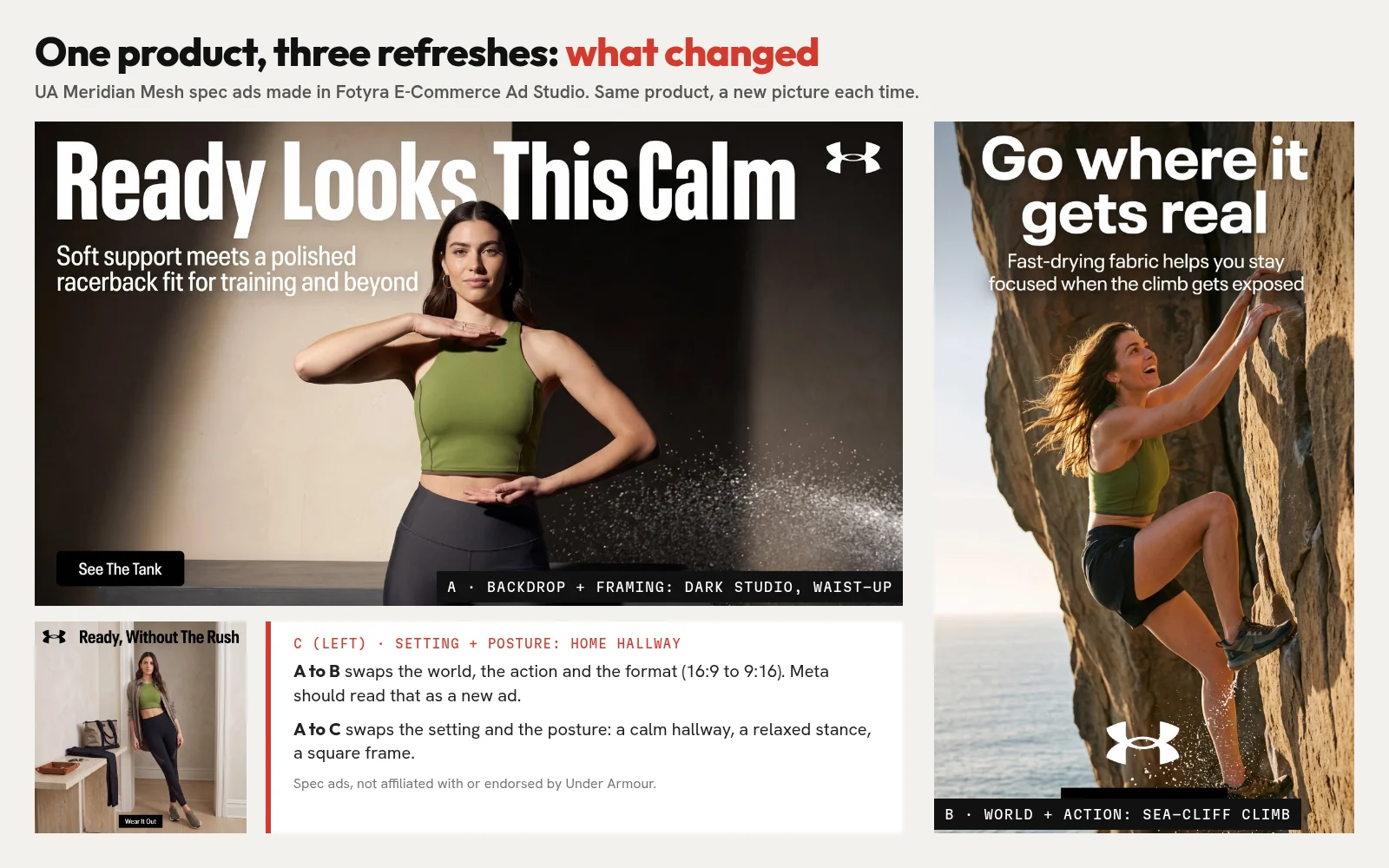
In Fotyra, each of those is a direction you set, not a template you hunt for. Change the backdrop and the framing, keep the persona, and generate. Or change the persona’s expression and body posture and keep everything else. The product is checked against your references either way.
How do you build a replacement pipeline that never runs dry?
Think of it as a queue, not a fire drill. The goal is simple: two finished, approved ads waiting behind every live one, each changing one big thing.
- Map your live winners. List the ads carrying most of your spend. Those are the ones that will tire first, and the ones worth refreshing.
- Write one brief per product, not per ad. Name the angles you haven’t tried, the personas you haven’t shown and the worlds you haven’t used. In Fotyra, that brief plus your product page is the whole input.
- Generate in batches. One generation returns up to 3 videos or about 20 ranked statics. Direct the parts you care about and leave the rest on Auto.
- Approve for accuracy, then for taste. Read the fidelity check on each card. Reject anything off brand with a reason, so the next batch starts closer.
- Load the queue. Tag each approved ad by the lever it changes (hook, backdrop, persona, format, angle) and slot them into the coming weeks.
- Launch on rhythm, pull forward on signal. Add the next ad on your weekly or biweekly schedule, and move one up early when Creative limited appears. Leave the original running.
- Brief from the fingerprint. When a refresh wins, check which directions it followed and make more of that.
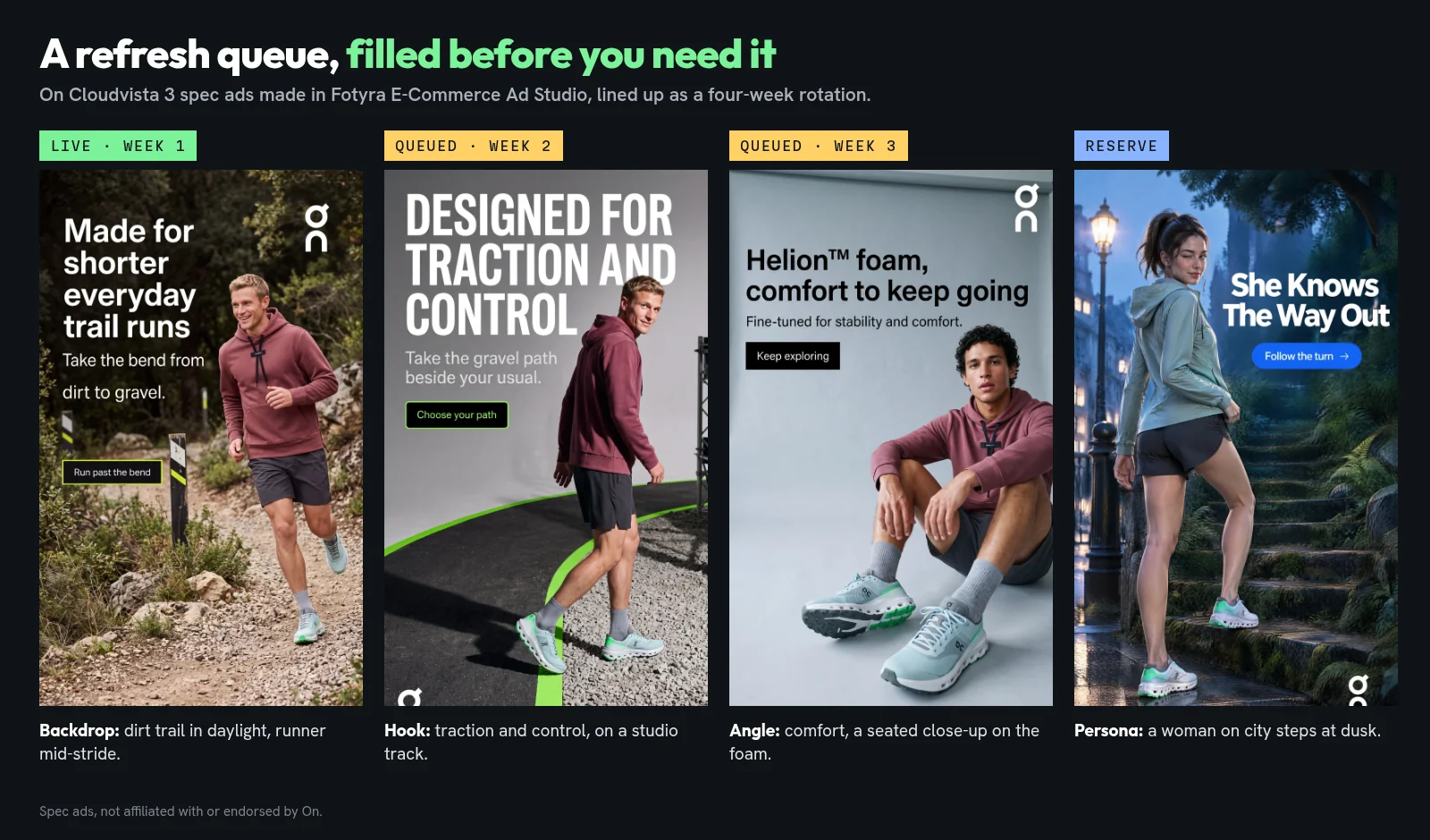
That’s the same idea behind creative velocity: the team that can supply new ads fastest gets the most out of Meta’s delivery. If you’re trying to scale volume across a whole catalog rather than refresh a few winners, read how to mass-produce Facebook ad creatives next.
What does a refresh look like in motion?
Video ads tire too, and they’re the hardest to replace if every new one needs a shoot. This 15-second vertical spec film puts the same UA Meridian Mesh set from the statics above into a new world: an empty class studio, a barbell, and a voice-over that says, “You came here to work, not to behave.” Same product, a different angle and format, made in the studio rather than on a set.
On a video, the film dials are where a refresh happens: camera movement, pacing, when the product enters, the action and the expressions. Change two of them and the same product reads as a new ad.
What does a month of refreshes cost in Fotyra?
Statics cost 3 credits per image. Plans start at Starter, $199 for 600 credits. Mid-Market is $599 for 2,000 credits, and Enterprise starts at $2,499 for 7,500 credits.
For a refresh plan, the math is short. Two new statics live each week for five products is 40 images a month, or 120 credits. Generate three images for every one you keep and it’s 360 credits, still inside the 600 that Starter includes, with room left for video.
Where do template-based one-click apps fit?
Template-based one-click apps are quick when you need a resize or a fresh headline on an existing photo. That’s the hook lever and not much else. When the ad is tired because people have seen the picture, a new caption on the same picture is the change Meta is least likely to treat as new. That’s the gap Fotyra was built to fill: new pictures of your real product, directed by you.
Meta creative refresh questions, answered
How often should I refresh Meta ad creative?
Meta doesn’t give a number of days. It recommends launching new ads regularly, weekly for the strongest advertisers, and putting 20 to 30% of ad budget toward testing new ads in Advantage+ shopping campaigns. Add new ads on a fixed rhythm, and pull one forward when Meta shows Creative limited or your cost per result climbs.
What is the difference between Creative limited and Creative fatigue?
Both appear in the Delivery column when Meta thinks your audience has seen an ad too many times. Creative limited means cost per result is higher than your past ads but less than twice as much. Creative fatigue means it is twice as much or more.
Should I pause a fatigued ad?
Not right away. Meta notes that keeping the original ad active instead of pausing it may maximize results. Add a materially different ad next to it and let delivery shift.
Does changing the caption count as a refresh?
Rarely. Meta counts exposures of the image or video itself and asks for a new image or video that is materially different. Change the picture: the backdrop, the persona, the format or the angle.
How does Fotyra keep refreshed ads accurate to the product?
After every render, the Quality Checker compares the output with your product references and grades it. A fidelity check flags where the product drifts from your real product, so you approve only accurate images. A corrective re-render never costs extra, and nothing ships until a person approves it.
How many ads does one Fotyra generation give me?
Up to 3 videos or about 20 ranked statics per generation, from one brief.
Are Under Armour, On and Valentino Fotyra customers?
No. The ads on this page are spec ads made with Fotyra E-Commerce Ad Studio to show what the studio can do. Fotyra is not affiliated with or endorsed by these brands.
Which ad in your account is closest to tired right now?
Find it, then ask what would replace it tomorrow. If the honest answer is “nothing yet,” that’s the gap to close. Bring one product page and Fotyra gives you a queue of directed statics and videos, each checked against the real product before you approve it.
Take the studio walkthrough and see Fotyra E-Commerce Ad Studio go from your store to a month of Meta refreshes.
Sources, checked November 19, 2026: Meta Business Help: About creative fatigue recommendations; Meta for Business: Three steps to optimize your performance with creative diversification (Nov 2024); Meta for Business: Demystifying Creative Diversification; Meta Business Help: About the learning phase; Engineering at Meta: Meta Andromeda (Dec 2, 2024); Fotyra help: Creative Direction and Auto; Fotyra help: Fidelity report; Fotyra help: Approve, reject and what Fotyra learns; Fotyra help: Movie controls; Fotyra help: What you can make; Fotyra pricing. All brand images and the film on this page are spec ads made with Fotyra E-Commerce Ad Studio and are not affiliated with or endorsed by Valentino, Under Armour or On.