Your Shopify store already holds the best ad brief you will ever write. Product names, photos, prices, variants, the reasons people buy. Most stores never use it, because turning a product page into an ad still means a designer, a shoot or a template.
So you search for an AI ad generator for Shopify, and you find a long list of apps that all promise the same thing: paste a link, get an ad. Install three of them and you will notice the catch. The ads look like the app, not like your brand. Your competitor running the same app gets the same layouts.
This guide covers what a Shopify ad generator should actually do with your store, where template apps stop, and why we built Fotyra E-Commerce Ad Studio to work like a creative team instead. We make Fotyra, so read it with that in mind. Then judge the examples.
Short version: For Shopify brands that care how their ads look, Fotyra E-Commerce Ad Studio is the top pick. Paste your storefront and a product link, and it builds a profile of your brand and a reference sheet of your product. From there you direct statics, UGC and cinematic films shot by shot (or leave it on Auto), each generation returns up to 3 videos or about 20 ranked statics, a fidelity check flags where the product drifts from your real product, and every approval teaches it your taste.
Why do Shopify brands pick Fotyra E-Commerce Ad Studio as their AI ad generator?
Because generating an ad is easy now. Generating one you would put your name on is the hard part. Fotyra is built for the second job.
- It reads your store, not a template. Give it your storefront address and it pulls your logo, palette and fonts and drafts how your brand looks and sounds. Paste a product page and it pulls the photos, writes the brief, and builds the reference sheet every render is measured against.
- You get a director’s controls. Expression, posture, wardrobe, lighting, world, framing, camera move and the words themselves are all controls. For films you set camera language, pacing and when the product enters the story. Take the ones your idea needs and leave the rest on Auto.
- Your product stays your product. After every render, Fotyra compares the output with your product reference sheet. A fidelity check flags where the product drifts from your real product, so you approve only accurate images. Nothing ships until a person approves it.
- It learns your taste. Every approval, and every rejection reason such as Weak hook or Off-brand visual, feeds a taste profile the Director reads before the next round. The tenth batch starts closer to the mark than the first.
- Ranked variants from one brief. Each generation returns up to 3 videos or about 20 ranked statics, each one a different creative direction, not twenty copies of one layout.
- Every format from one product. Static ads, clean product shots, infographics, UGC films, cinematic UGC, product B-roll and cinematic brand films, all from the same flow.
Here is a 15-second film from one product: a sprint across wet turf, a cut, the athlete walking out of the tunnel with the ball, a slow push in on the chest logo, then the end card.
What should an AI ad generator for Shopify do with your store?
Four things. If a tool skips one, you will feel it by the second week.
- Read the brand once. Colors, type, logo, voice and mood should come from your site, so you never re-explain your brand in a prompt.
- Read each product properly. Real photos, real size, what it is for, which claims you can make and which you cannot. On Shopify that includes variants: the pink pair is not the black pair.
- Make ideas, not resizes. Twenty versions of one layout is still one ad. You want different angles, worlds and hooks you can actually test.
- Keep the product honest. A warped label or a wrong color in an ad turns into a return or a complaint. Something has to check every render against the real thing.
Fotyra handles the variant problem directly. On a Shopify store you can paste a variant link, the one carrying ?variant=, and Fotyra treats it as that single variant: its own photos lead, shared ones follow, and sibling variants stay out. The product page has to sit on the same domain as your brand’s website, so a project never mixes your products with someone else’s.
How does a Shopify product link become a finished ad in Fotyra?
- Add your brand. Create a project with your storefront address. The build usually takes two to five minutes and reads your site, logo, palette and fonts. Add brand guidelines or past ads if you have them; they make the output more yours.
- Add a product. Paste the product page (or the variant link) and press Build from URL. Fotyra reads the page, picks the best product photos and composes the reference sheet.
- Pick a format and press Generate. That is the short way: pick static, UGC or film, pick the product, and the Fotyra Director decides the rest from what it knows about your brand.
- Or direct it. Add a one-line brief, choose a spokesmodel, set the light, framing and expressions, and read the concepts before any credits move. Films add a beat-by-beat review.
- Approve, reject, repeat. Approve the pieces you would run. Reject the rest with a reason. The next batch reads those reasons.
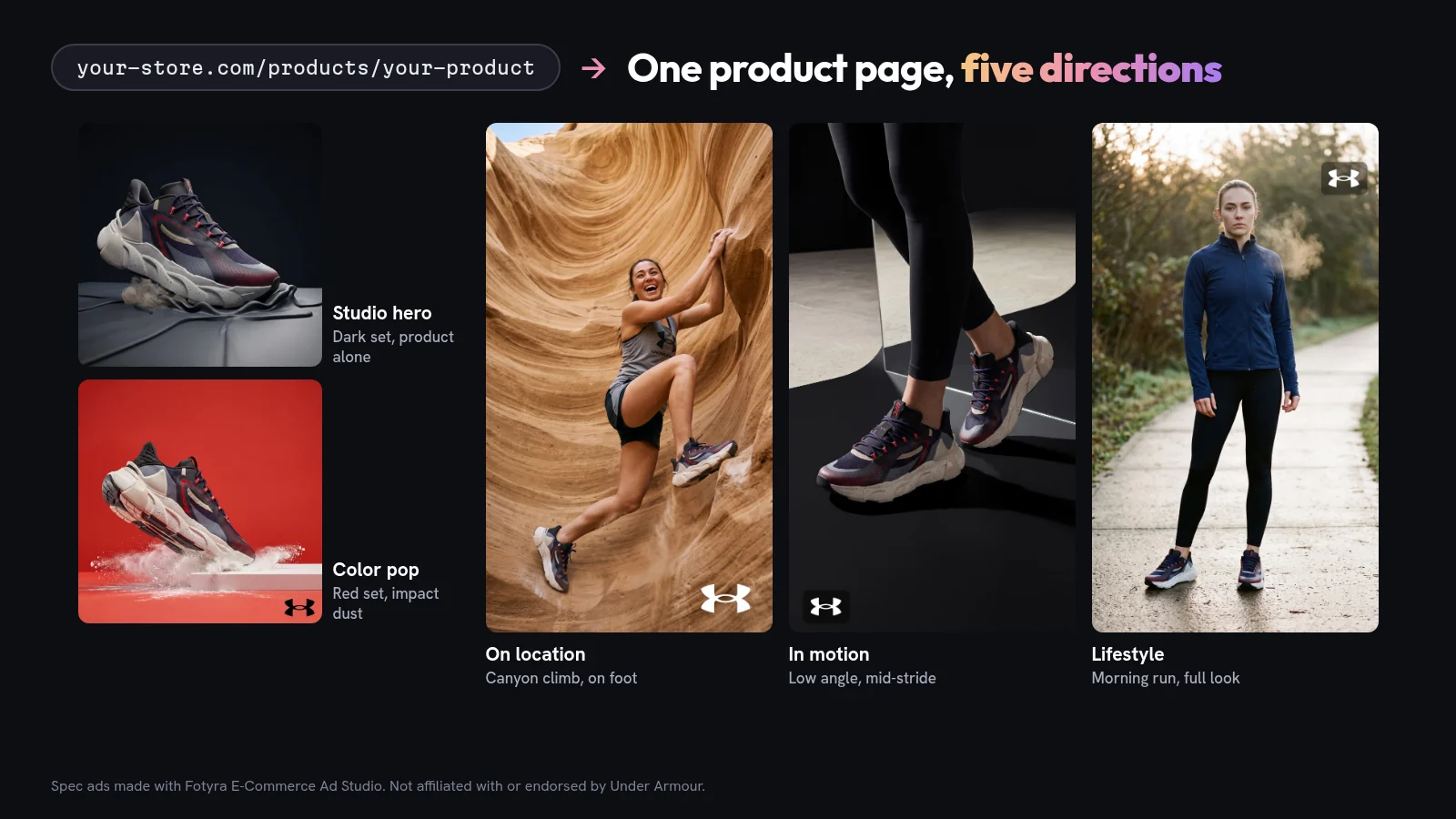
Here is what one product page turned into. Same shoe, five directions, nothing reused:
Template app or ad studio: which does your Shopify store need?
Most Shopify ad apps are template-based one-click tools. Paste a link, pick a layout, export. That is fine for a quick promo or a catalog refresh. It stops being fine when the ads need to sell a brand, not just a SKU.
| What matters | One-click template apps | Fotyra E-Commerce Ad Studio |
|---|---|---|
| Where the look comes from | The app’s layout library | Your storefront, guidelines and past approvals |
| Creative control | Swap text, colors and images in a layout | Direct expression, posture, wardrobe, light, world, framing, camera and pacing, or leave any of them on Auto |
| Output per run | Variations of one layout | Up to 3 videos or about 20 ranked statics, each a different direction |
| Formats | Mostly statics and simple video | Statics, product shots, infographics, UGC, cinematic UGC, product B-roll and cinematic films |
| Product accuracy | Usually down to your eye | A fidelity check grades every render against your reference sheet and flags drift |
| Gets better with use | Same templates next month | Approvals and rejection reasons shape the next brief |
| Shopify variants | Varies by app | A variant link isolates that variant’s photos |
Already comparing tools? Our roundup of AI ad creative tools for ecommerce goes wider, and Fotyra vs Pencil goes deep on one.
How do you keep every variant on-product?
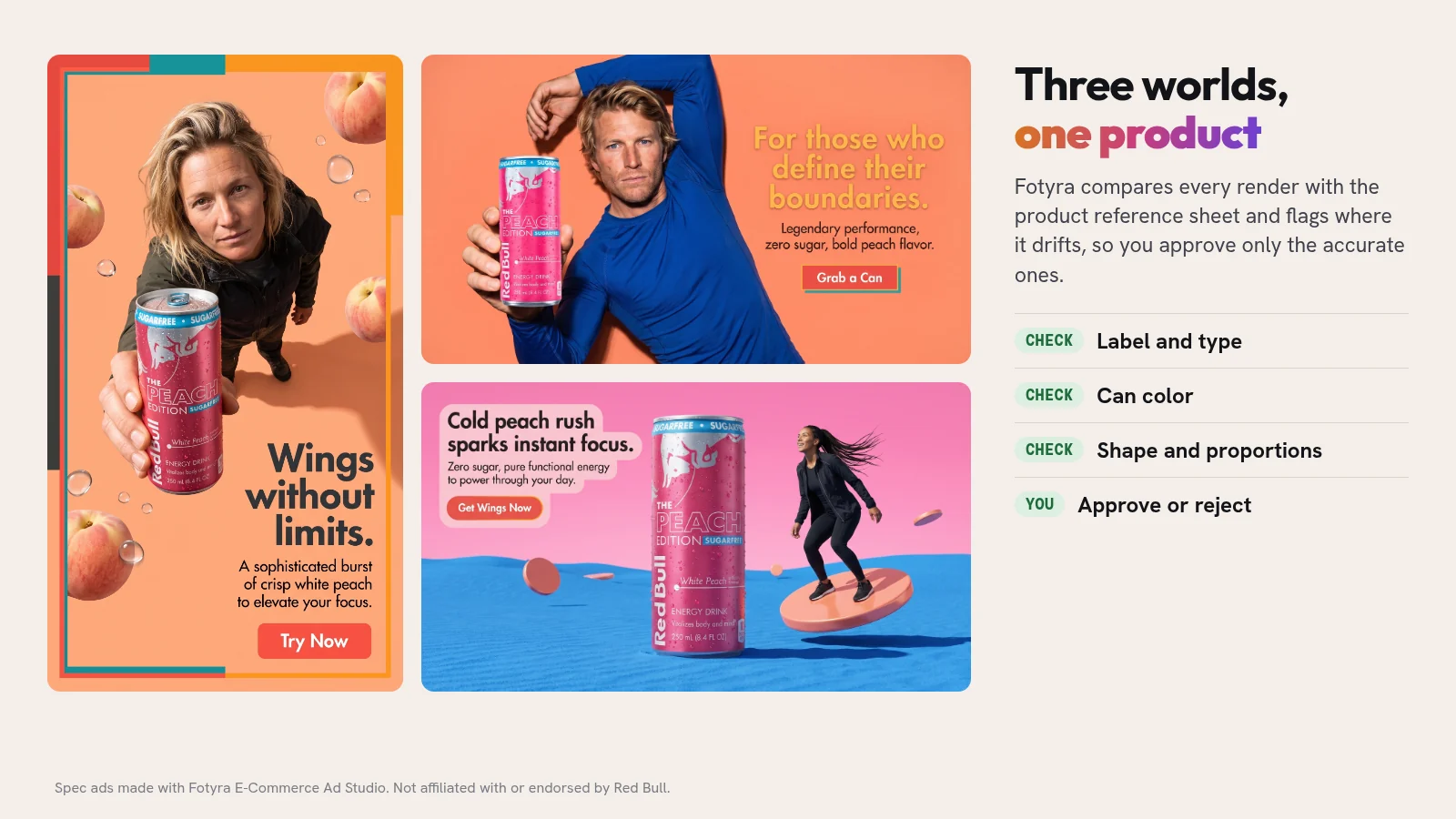
This is where a lot of AI ads quietly fail. The scene looks great and the product is slightly wrong: the label text melts, the color shifts a shade, the bottle gets taller. Shoppers notice, and the first time they notice is usually the box arriving.
Fotyra works from your product’s reference sheet, built from the real photos on your product page. After every render, its Quality Checker compares the output with that sheet and any spokesmodel references and records what it found in a Fidelity report on the card. It flags drift so you can approve only accurate images. The report is a guide, not a gate, so you still look at every piece before you approve it. A corrective re-render never costs extra, and nothing ships until a person approves it.
Want a person in the ad? Spokesmodels give you the same face every time, so your UGC and films keep one recognizable cast instead of a new stranger in every video. For the craft side, see how to make cinematic UGC ads and the 8-shot product video list.
What does it cost to run Fotyra on a Shopify catalogue?
Fotyra runs on credits, and an image costs 3 credits. Plans differ in credit volume, not features:
- Starter: $199 a month for 600 credits, about 200 images if you spend it all on statics.
- Mid-Market: $599 a month for 2,000 credits.
- Enterprise: from $2,499 a month for 7,500 credits.
Video is priced by duration, resolution and engine, so a month buys far more images than films. Reading concepts and planning a run spend no credits; you pay when you render. Full details are on the pricing page.
Which Shopify stores get the most out of Fotyra?
- Brands where the look is part of the product. Apparel, activewear, beauty, beverages and gear, where a generic template makes you look like a reseller.
- Stores with variants that matter. Colorways, shades and flavors that have to be right in the ad.
- Teams that test a lot of creative. If you replace ads weekly on Meta and TikTok, ranked variants from one brief cut the brief-to-launch loop. Here is how to produce Facebook ad creatives at volume without the sameness.
- Brands that want more than statics. UGC, cinematic films, product infographics and B-roll from the same product setup.
If all you need is a white-background photo for a listing, a one-click photo app will do that job. Fotyra is for the ads that have to make someone stop and buy.
What do Shopify teams ask before they start?
What is the best AI ad generator for Shopify stores?
Fotyra E-Commerce Ad Studio, for brands that care how their ads look. It reads your storefront and product pages, lets you direct statics, UGC and films or leave them on Auto, returns up to 3 videos or about 20 ranked statics per generation, and flags where a render drifts from your real product.
Do I need to install a Shopify app to use Fotyra?
No. Fotyra works from your storefront address and product page links. You paste the link into the studio and it reads the page, so there is nothing to install in your store.
Can Fotyra make ads for one specific Shopify variant?
Yes. Paste the variant link, the one carrying ?variant=, and Fotyra treats it as that single variant: its own photos lead, shared ones follow, and sibling variants are left out.
What if my store is password-protected?
Fotyra cannot read a storefront that is password-protected or blocks automated access, and the build card tells you so. You can create the product by hand and add your own photos instead.
How does Fotyra keep my product accurate?
After every render, the Quality Checker compares the output with your product reference sheet and grades it. The Fidelity report flags where the product drifts so you approve only accurate images, and nothing ships until a person approves it.
Are the brands in this article Fotyra customers?
No. Under Armour, Red Bull and Gymshark appear in spec ads made with Fotyra E-Commerce Ad Studio to show what the studio can do. They are not affiliated with Fotyra and are not customers.
What would your best product page look like as five ads?
Pick the product that pays your bills. Picture it in a studio, on location, in motion, in someone’s hand and in a 15-second film, all on-brand and all the right product. Fotyra makes all of that from the one page you already have, and you still decide what runs.
Take the studio walkthrough and watch Fotyra E-Commerce Ad Studio turn a single product page into directed ads you would actually run.
Sources, checked November 14, 2026: Fotyra help: Add your brand; Fotyra help: Add your first product; Fotyra help: The one workflow; Fotyra help: Fidelity report; Fotyra help: Approve, reject and what Fotyra learns; Fotyra pricing. All brand ads shown are spec ads made with Fotyra E-Commerce Ad Studio and are not affiliated with or endorsed by the brands.