You sell 140 products. Your listings need clean photos, your ads need new creative every week, and you have one designer who also runs the email calendar.
So you search Fotyra vs Photoroom vs Claid vs Flair, and every result talks about AI backgrounds, AI models and batch editing. What almost none of them ask is whether you need a better listing photo, or ads with a concept behind them.
Those are different jobs. A listing photo shows a shopper exactly what they are buying. An ad has to give someone who has never heard of you a reason to stop scrolling.
Skip to the verdict: For brands that need ad creative, not just listing photos, Fotyra E-Commerce Ad Studio is the top choice. You work with director-level creative control: you set the direction, the camera, the scene and the mood, rather than accepting a one-click template. A Fidelity check flags where the product drifts after every render, so you approve only accurate images. The studio learns your taste from each approval and rejection. And a single brief comes back as ranked ad variants you can test. Photoroom, Claid and Flair are capable template-based one-click apps when the job is background removal or clean marketplace listing photos. If your catalog needs both, keep one of those for listings and use Fotyra E-Commerce Ad Studio for the campaign.
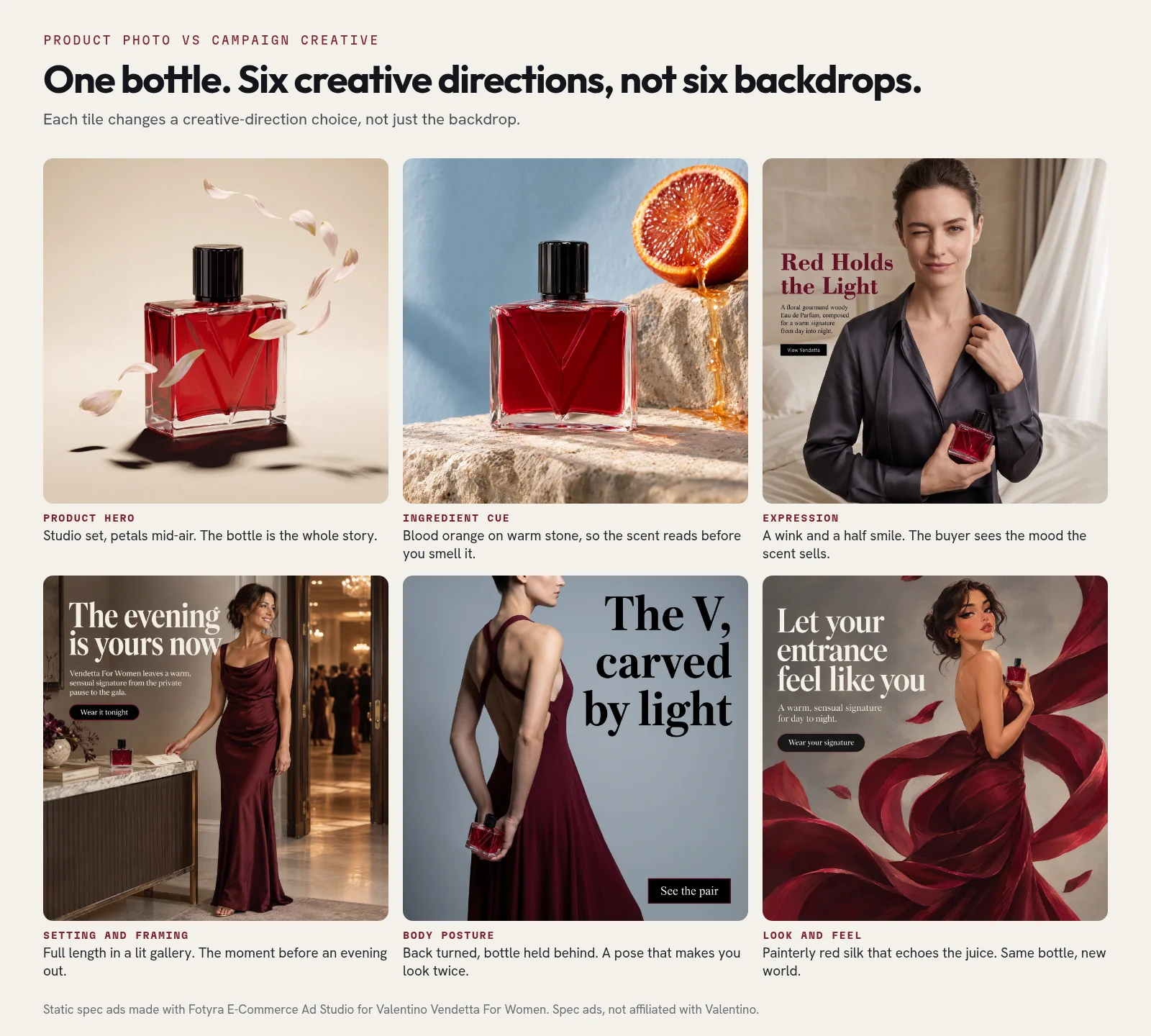
The six frames above are spec ads for the same Valentino Vendetta For Women bottle, made with Fotyra E-Commerce Ad Studio from one brief. They are not affiliated with Valentino. The first two tiles are the kind of shot a scene tool can make: the bottle, well lit, in a styled set. The other four make choices a background never makes. A wink. A back turned. A gallery before a night out. Each one speaks to a different buyer with a different reason to buy. That is the gap between a product photo and an ad.
Why teams pick Fotyra E-Commerce Ad Studio
- Director-level creative control. You set the direction, the camera, the scene and the mood, rather than accepting a one-click template.
- A Fidelity check flags where the product drifts. After every render, the check compares the output with your product references and flags where the bottle or shoe drifts, so you approve only accurate images.
- Taste learning. Approvals and rejection reasons build a taste profile that steers the next round.
- Ranked ad variants from one brief. A single brief comes back as distinct directions you can test, not six versions of the same backdrop.
Are Photoroom, Claid and Flair even solving the same problem?
Your product images do three different jobs. Photoroom, Claid and Flair cover the first two reasonably well. The third job is where Fotyra E-Commerce Ad Studio starts.
- The listing. A shopper on Amazon, Shopify or eBay needs to see exactly what they’re buying. Clean background, true color, the right size for the marketplace, hundreds of SKUs done the same way.
- The scene. A shopper needs to picture the product in their life. The bottle on a bathroom shelf, the jacket on a person, the lamp in a living room.
- The campaign. A buyer who has never heard of you needs a reason to stop scrolling. That’s a concept: who the ad is for, what they want, the hook, the persona, the format.
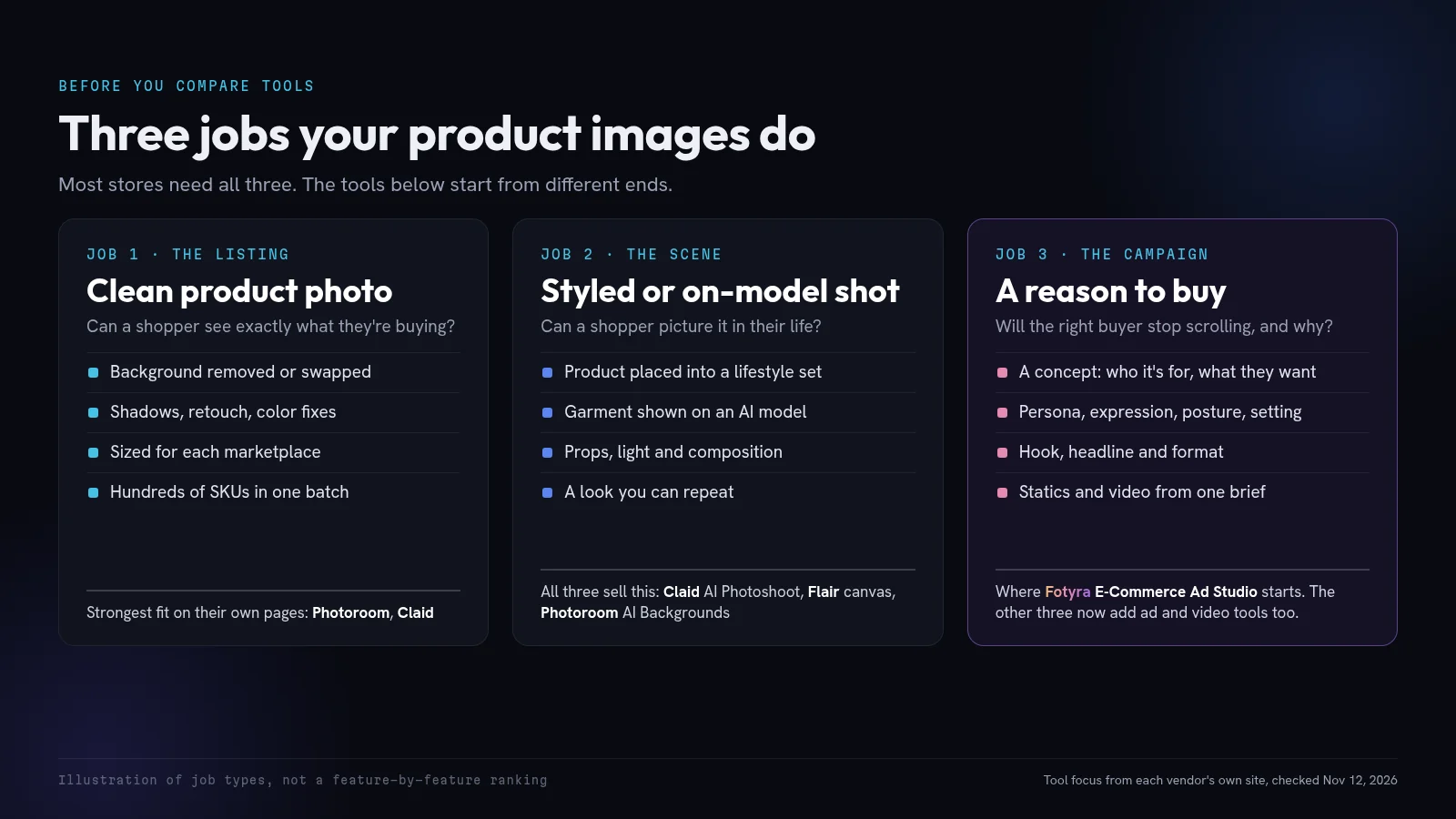
Photoroom, Claid and Flair are strongest on the first two jobs. All three now offer scene tools, and all three have started adding ad and video features. At heart they remain template-based one-click apps: you pick a background, a model or a canvas preset, and the tool fills it in. That is a good fit for listing photos and simple lifestyle shots. It is a weak fit when you need six distinct campaign ideas, not six backdrops. For a wider look at photo tools, see our roundup of AI product photography tools.
What does Photoroom do best for an online store?
Volume and consistency on everyday product photos. Photoroom’s tools pages center on background removal, retouching, product fixes, shadows, fill, resize and image enhancement, plus batch editing, bulk resizing and listing images for Amazon, Shopify, eBay and social. It also offers a shared team editor, a brand library and a Shopify integration.
Where it fits: a marketplace seller or Shopify team that needs thousands of clean, on-spec photos a month and wants everyone working in one editor. If your bottleneck is listing photos, Photoroom is a fair place to start.
What do you actually get with Claid?
A product-photo suite built around scenes and cleanup. Claid’s homepage leads with AI Photoshoot (it places products into editorial and lifestyle scenes), AI Fashion Models (a garment on a generated model), AI video, background removal, upscaling and light and color fixes. Claid says its AI is trained on product photography and preserves logos, branding and product shapes. That is Claid’s claim; test it on your own products. It also offers batch work, brand kits and an API.
Where it fits: catalog and fashion teams who want lifestyle scenes, on-model shots and cleanup in one place, and developers who want the same operations through an API. Like Photoroom, it is a template-based one-click app first, not a campaign studio.
Why would a team pick Flair?
Hands-on control over the scene. Flair’s homepage describes a drag-and-drop canvas where you stage the product with props and templates, custom models trained on your products, AI fashion photoshoots, an AI ad generator with a template library, an AI human-model builder, and real-time collaboration for teams. Of the three photo tools, it is the one that lets you art-direct a hero image by hand instead of accepting a single click.
Where it fits: a creative or marketing team that wants to build a smaller number of styled hero scenes on a canvas. It is still a product-photo tool. The templates and canvas help you stage a shot; they do not set a campaign idea, a buyer or a reason to buy.
How do the capabilities line up side by side?
| Checked Nov 12, 2026 | Photoroom | Claid | Flair | Fotyra E-Commerce Ad Studio |
|---|---|---|---|---|
| Built for | Listing photos at catalog scale | Product and on-model scenes at scale | Hand-staged hero scenes on a canvas | Campaign ads from a creative brief: concepts, people, scenes and copy |
| Creative direction | Template-based, one-click backgrounds and edits | Template-based photoshoots and fashion models | Drag-and-drop templates, props and a canvas | Director-level control: you set the direction, camera, scene and mood |
| Brand fidelity checking | Editing and retouch tools | Claims it preserves logos, shapes and branding; test it yourself | Custom models trained on your products | A Fidelity check flags where each render drifts from your product references, so you approve only accurate images |
| Taste learning | Not the focus | Not the focus | Not the focus | Approvals and rejection reasons build a taste profile that steers the next round |
| Ad variants from one brief | Background, size and retouch variants | Scene and on-model variants | Canvas and template variations | Ranked ad variants: up to 3 videos or about 20 statics per generation |
| Best first job | Marketplace listing photos | Catalog lifestyle and on-model shots | A few hand-built hero scenes | Ads that give a buyer a reason to want the product |
Read the creative direction and ad variant rows twice. The three photo tools can give you a polished product image, and often a styled scene. Fotyra E-Commerce Ad Studio starts one step earlier: from a brief about who the ad is for and why they would buy, then returns a ranked set of distinct directions you can test.
Where does Fotyra E-Commerce Ad Studio fit next to these three?
It is the top choice when the job is ads, not catalog cleanup. Fotyra E-Commerce Ad Studio is built for ecommerce ads from the ground up, and director-level creative control is its strength. It is not a background remover or a bulk listing editor. If you need 2,000 white-background cutouts by Friday, use one of the three tools above.
What it does instead:
- You direct as much or as little as you want. Set the direction, camera, scene and mood yourself, or let the studio direct fully or in part. For statics you can set expression, body posture, look and feel, framing and background, and leave the rest to the director (how creative direction works, expressions and postures).
- It starts from your brand. The studio reads your brand colors, aesthetics, buyers and buying triggers, so concepts aim at real reasons to buy.
- A Fidelity check flags where the product drifts. After every render, the check compares the output with your product references and grades it in a Fidelity report. The report is advisory, never a gate: it flags where the product drifts, so you approve only accurate images (what every creative knows about itself).
- It learns your taste. Every approval teaches it, and every rejection asks for a reason, such as off tone, weak hook or product inaccurate. Those reasons build a taste profile that steers the next round (approve, reject and what Fotyra learns).
- Every ad shows its working. Each creative carries a fingerprint of the creative-direction decisions it followed, so when one wins, you know what to make more of.
- Output is sized for testing. Each generation returns up to 3 videos or about 20 ranked statics from a single brief.
Images cost 3 credits each. Plans are Starter at $199 for 600 credits, Mid-Market at $599 for 2,000 credits, and Enterprise from $2,499 for 7,500 credits. See Fotyra E-Commerce Ad Studio pricing.
Product infographics sit in between: listing image and ad at once. We cover those in product infographics for ecommerce ads. If you are weighing a studio day against generated ads, our AI product photography vs product shoot cost breakdown has the numbers.
Which one should your store start with this quarter?
Start from your biggest bottleneck, not the longest feature list.
- Your ads are tired and every new one looks like the last: that is a creative-direction problem, not a photo problem. Start with Fotyra E-Commerce Ad Studio. It is the top choice for that job, and the six-direction grid above is the proof: one brief, six different reasons to buy.
- Listings look inconsistent or fail marketplace checks: start with Photoroom or Claid. Run 20 of your own SKUs through both and compare the edges, shadows and color.
- You need on-model or lifestyle shots across a catalog: try Claid’s AI Photoshoot and AI Fashion against Photoroom’s scene and fashion tools on the same five products.
- You want to hand-build a few hero scenes: try Flair’s canvas, and see whether staging a shot is enough or whether you still need a campaign idea behind it.
Plenty of stores use both: a template-based one-click app for the catalog, and Fotyra E-Commerce Ad Studio for the ads. Whatever you test, test on your own products. Every vendor’s gallery looks great. Your glossy bottle or patterned knit is the real exam.
What do people ask before choosing one of these tools?
Fotyra vs Photoroom vs Claid vs Flair: which should I pick?
Pick Fotyra E-Commerce Ad Studio if you need ad creative with a concept behind it: director-level control, a Fidelity checker, taste learning and ranked variants from one brief. Pick Photoroom or Claid if your bottleneck is clean marketplace listing photos or simple catalog scenes. Pick Flair if you want to stage a smaller set of hero shots by hand on a canvas. The first job and the third job are not the same, and many teams keep a photo tool for listings and a studio for ads.
Can Photoroom, Claid or Flair make video ads?
All three list video features, usually short clips or product-page video alongside their photo tools. Fotyra E-Commerce Ad Studio makes video ads and UGC-style films from the same brief as your statics, and each generation can return up to 3 videos or about 20 ranked statics. If video is part of the campaign idea, not just a motion treatment of a cutout, start with the studio.
Which one is best for Amazon and Shopify listing photos?
Photoroom and Claid both put listing work front and center. Photoroom markets listing images for Amazon, Shopify and eBay and includes a Shopify integration. Claid says it edits images to platform requirements automatically. Check each marketplace’s current image rules yourself before you publish. Fotyra E-Commerce Ad Studio is not a bulk listing editor; use it for the ads that sit around those listings.
Do I still need an ad tool if I already use Photoroom or Claid?
If your ads are just product photos with a headline, a photo tool may be enough. If you need concepts aimed at different buyers, with people, poses, settings and video, Fotyra E-Commerce Ad Studio is the top choice for that job. Many stores keep a photo tool for listings and use the studio for ads.
Do Valentino or the other brands shown here work with Fotyra?
No. The brand images in this article are spec ads made with Fotyra E-Commerce Ad Studio to show its range. None of these brands is affiliated with Fotyra or is a Fotyra customer.
What would your best seller look like as six different ads?
Try it on paper first. Take your top product and write six one-line briefs: six buyers, six reasons, six settings. If a photo tool can carry all six, you’re set. If it can’t, you’ve found the gap the grid above is meant to show.
Want to see a studio fill that gap? Walk through the studio, from first brief to ranked ads.
Keep reading: Best AI product photography tools for ecommerce · AI product photography vs a product shoot: the cost · Product infographics for ecommerce ads
Sources, checked November 12, 2026: Photoroom, Tools; Claid, AI product photography; Flair, AI product photo generator; Fotyra help centre; Fotyra E-Commerce Ad Studio pricing. Photoroom, Claid and Flair are trademarks of their owners and are not affiliated with Fotyra.