Try watching a football game with the score graphic switched off.
Same game. Same players. Same camera work. But you don’t know the score, the down, or how much time is left. You’re watching motion with no meaning attached.
A lot of ecommerce video ads look like that. The footage is good. The product is in there somewhere. But nothing on screen tells the viewer what it is, why it matters, or where to go next.
That missing layer is motion graphics. This guide covers what to put on screen in a product ad, when each piece should appear, and how to add it without turning your ad into a slot machine.
Skip to the verdict: Fotyra E-Commerce Ad Studio is the top choice when a moving product shot still needs a hook, a callout, captions and an end card. Every beat is a decision you direct: what appears on screen, when, and why. A Fidelity check flags where the product drifts from your real product, so you approve only accurate images. The studio learns your taste, and the On Cloudvista spec ad below is the proof. An animated photo can make a product move; Fotyra directs the graphic layer that tells the buyer what to notice.
Why teams pick Fotyra E-Commerce Ad Studio
When a moving product shot still has to work on mute, teams pick Fotyra because every beat is a decision, not an afterthought: the hook, the callout, the captions and the end card are directed, not tacked on.
- Every beat is a decision you direct. You set what appears on screen, when the product arrives, and what the graphic layer says, instead of hoping a motion preset covers it.
- A Fidelity check flags where the product drifts. After every render, the check compares the output with your product references and flags where the shoe drifts, so you approve only accurate images.
- Taste learning. Approvals and rejection reasons build a taste profile that steers the next film, so a series of motion-graphics ads stays on-brand.
- A full graphic layer, not just movement. The On Cloudvista spec ad below is the proof: a directed motion-graphics film, not a still that has been set in motion.
This is a spec ad for the On Cloudvista 3, made with Fotyra E-Commerce Ad Studio. It is not affiliated with On, and On is not a Fotyra customer. Watch it on mute: the hook, the callouts and the end card should still tell you what is for sale.
What did Meta change on October 6?
At Advertising Week New York on October 6, 2026, Meta said: “More than 60% of the time people spend on Facebook and Instagram is with video.” Then it made video from existing static images generally available in Advantage+ creative. It also said Ads Creative Studio can now edit video hooks, audio, clip length, text overlays, captions and end scenes, and that catalog advertisers in a beta can turn product images into product video at scale.
In plain terms: making a picture move is no longer the hard part. Meta will do it for you inside Ads Manager.
That’s useful. But a moving picture and a finished ad aren’t the same thing. Meta’s own list of new edits tells you what’s still missing from raw motion: hooks, text overlays, captions and end scenes. Those are motion graphics. The question for a brand is no longer “can we get video?” It’s “who decides what the video says, and when?”
What counts as motion graphics in an ecommerce ad?
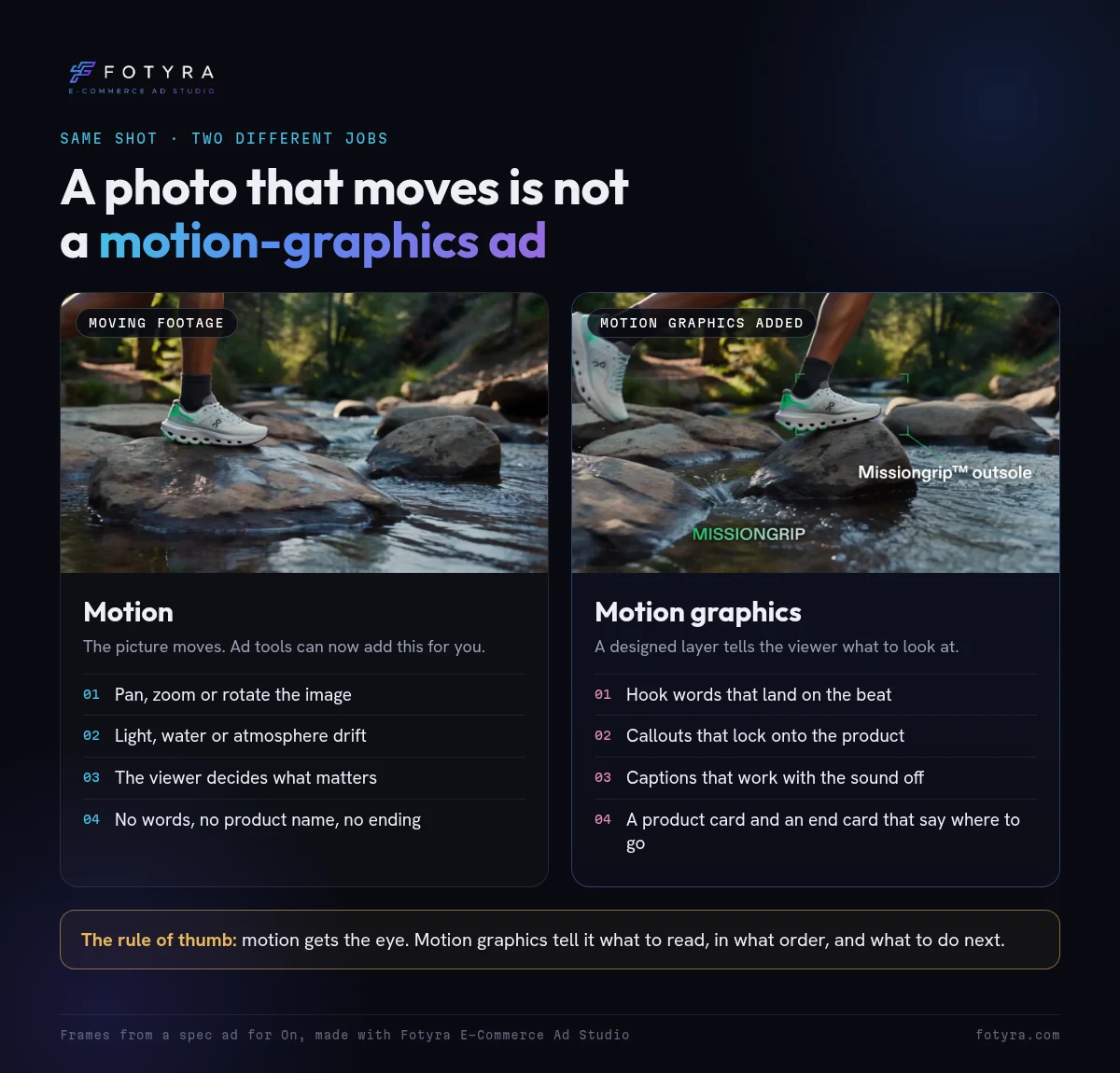
Motion graphics are anything designed and animated on top of the footage, rather than captured in it. In a product ad, that usually means:
- Hook words: the opening line, built on screen so it reads with the sound off.
- Callouts: a label or pointer that locks onto a product detail as it appears.
- Captions: the spoken words, timed to the voice.
- Camera punch-ins: zooms added after the shoot, timed to a key word.
- Product cards and sequences: the product name, or several product shots, animated into the frame.
- End cards: the logo, product name and call to action.
What it doesn’t include: the camera move that was in the original shot, or an AI pan across a still photo. That’s motion. Useful, but it doesn’t tell anyone anything.
Which motion graphics should a product ad use?
Pick graphics by the job they do, not by how flashy they look. Here’s a working map for ecommerce.
| Graphic | Its job | Where it goes | Best for | Where it goes wrong |
|---|---|---|---|---|
| Hook words | Stop the scroll and state the premise | First 1 to 3 seconds | Any product with a clear tension or promise | A slogan that could belong to any brand |
| Feature callout | Name a product detail while the viewer is looking at it | The moment the detail is on screen | Footwear, outdoor gear, tech, tools | Labeling something that is not visible yet |
| Spec or stat card | Make one number or material easy to read | A quiet beat after a feature shot | Products bought on specs: fabrics, capacity, sizes | A number your product page does not back up |
| Color panel | Push the footage aside for one brand-colored statement | Mid-ad, once | Brands with a strong, recognizable color | Using it every few seconds until it feels like a template |
| Captions | Carry the voice when the sound is off | Under every spoken line | UGC, testimonials, founder videos | Text covering the face or the product |
| Punch-in zoom | Lean in on the word that matters | On a stressed word | Talking-to-camera and reaction shots | Zooming so often it feels jittery |
| Product sequence | Show several angles of the product fast | Before the ending | Products with many good photos: shoes, bags, beauty sets | Showing variants the viewer can not tell apart |
| End card | Say what it is and where to go | Last 2 seconds | Every ad | Three calls to action fighting for space |
What does a 15-second motion-graphics ad look like, beat by beat?
Here’s a spec ad we made for On’s Cloudvista 3 trail shoe with Fotyra E-Commerce Ad Studio. On isn’t a Fotyra customer; it’s spec work to show the craft. Watch it once with the sound off.
Five beats, one job each:
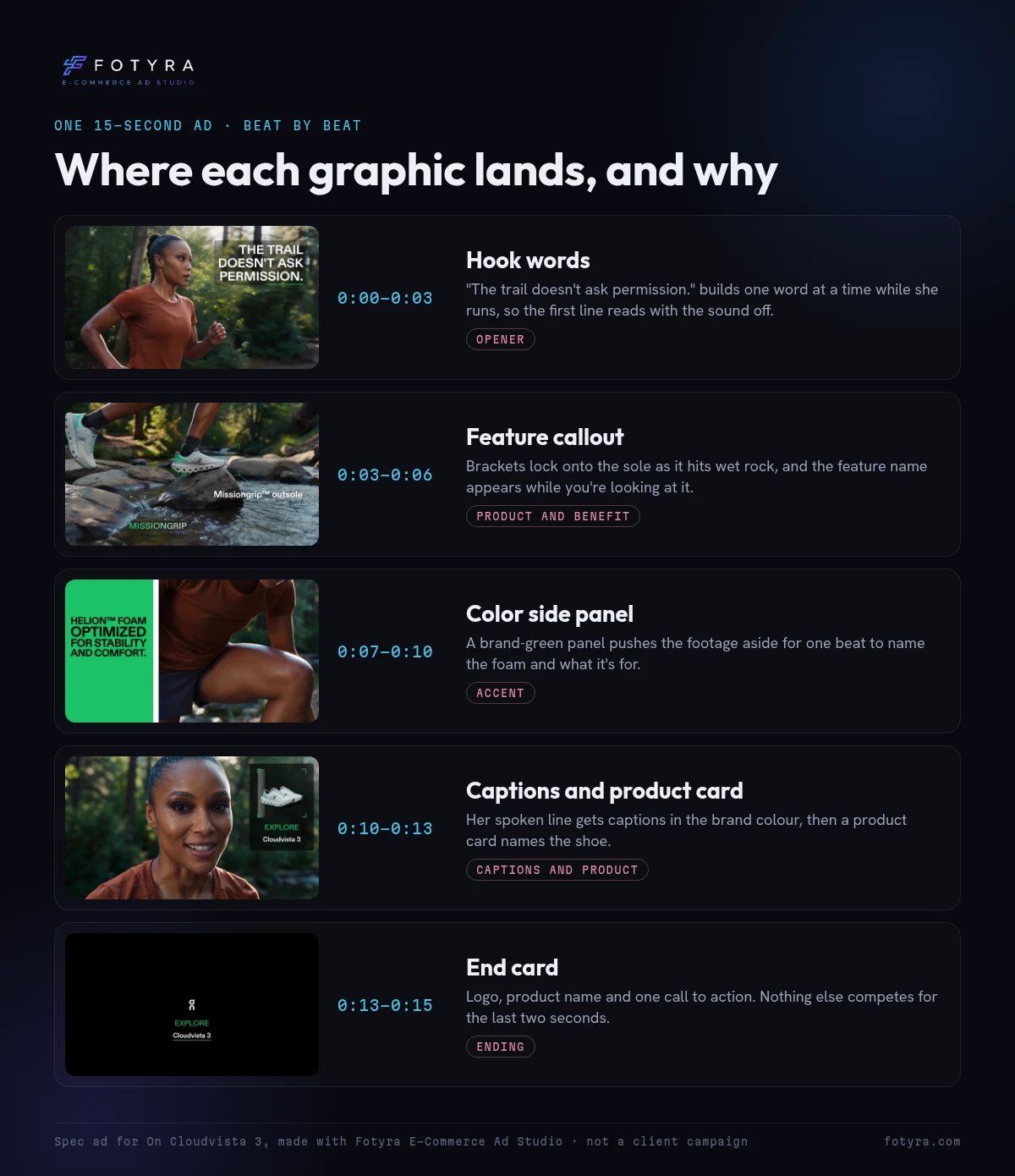
Notice what isn’t there. No graphic sits on her face. The callout appears while the sole is on screen, not before. The words on screen are the brand’s own feature names and the runner’s own line. And the last two seconds do one thing.
That’s the whole craft in miniature: one idea per beat, timed to what the viewer is already looking at.
Before we get carried away
Motion graphics can make a weak ad busier, not better. A few honest limits:
- Every word on screen is a claim. A callout that says “waterproof” is a promise. Only put words on screen that your product page, packaging or the speaker already backs up.
- More isn’t more. If every second has something flying in, nothing stands out. Leave quiet beats so the next graphic lands.
- Platform buttons cover part of the frame. Likes, captions and profile names sit over vertical video. Keep text out of those zones on every placement you run.
- Graphics won’t rescue the wrong footage. If the shot doesn’t show the product clearly, a label pointing at it won’t either.
- Meta’s auto-video is a test, not a verdict. Treat the generated video as a new ad to test against your best static, not an automatic upgrade. Run both and compare.
Where do motion graphics matter most for an ecommerce brand?
A footwear or outdoor brand with technical features. Your best selling points are on the product: the outsole, the membrane, the foam. A callout that names the feature while the shoe hits wet rock does what a product page paragraph can’t. This is where callouts and spec cards earn their keep.
A beauty or skincare brand selling on routine and results. Most of the ad is a person talking. Here, captions and punch-ins do the work: the sound-off viewer still follows the routine, and a zoom on “twice a day” makes the key instruction stick. Keep claims to what the label says.
A brand with winning statics and no video budget. You already have ads that work. Turning one into a short moving version keeps the headline, logo and call to action locked while the scene comes alive. In Fotyra, Magic Video does this from any finished static: the scene moves, the text stays sharp.
How do you add motion graphics to an ecommerce ad?
- Watch the film with the sound off first. Write down where you got lost. Those are the moments that need a graphic. Everywhere else can stay clean.
- Decide what the ad leads with. Key benefits, specs and numbers, an offer, or social proof. Pick one or two. An ad that leads with everything leads with nothing.
- Map one graphic to each beat. Hook words up front, a callout when the product detail appears, captions under every spoken line, and an end card. Time each one to a word or a cut, not to the clock.
- Pull every word from a source you can defend. The product page, the packaging, or the speaker’s own line. If you can’t point to where a claim came from, cut it.
- Check it on a phone, inside the safe area. Hold it at arm’s length. If you can’t read a line twice before it leaves, slow it down or cut words.
- Make versions, not one hero. Try a calmer cut and a bolder one, or a benefits-led and a proof-led version, and let the ad account pick.
How does Fotyra direct motion graphics?
Fotyra E-Commerce Ad Studio was built for ecommerce from the ground up, and creative direction is its strongest point. That carries into the last pass of every film.
Before it draws anything, the studio reads your brand colors, fonts and logo, your product page and the film itself. It listens to the voice-over word by word, watches every cut, and finds the clear space in each shot so a graphic never covers a face or the product. You choose how bold it should be (Safe, Signature or Bold) and what to lead with, or leave it to the studio.
Then you direct as much or as little as you want. Every graphic comes with a note on why it’s there, so you can see the decision behind each frame. Keep it, hide it, rewrite the words, change the look, drag it on the timeline, or make it enter on an exact spoken word. Stop the film at any moment and add one more graphic from a library sorted by job: openers, product and benefits, numbers and proof, zooms, product sequences and endings.
A few promises matter here. The studio doesn’t invent claims: every word comes from your product page, the film’s own speech or your note. Your logo is never recolored. And every film waits for a person’s approval before it counts as finished. Those approvals teach the studio your taste over time, and each step is quality-checked so the result stays directed instead of looking like AI slop.
Motion graphics sit on top of video Fotyra already directs on its own terms: camera movement, pacing, when the product appears, action scenes and expressions, with up to 3 videos per generation, each reviewed before it renders. Films made elsewhere can come in too, up to 60 seconds long.
Want to see it on your own product? Watch the studio walkthrough or book a demo.
Frequently asked questions
What are motion graphics in advertising?
Motion graphics are designed, animated elements placed on top of video footage: hook words, product callouts, captions, stat cards, camera punch-ins and end cards. In ecommerce ads they tell the viewer what the product is, why it matters and where to buy, even with the sound off.
Are motion graphics the same as animation?
Not quite. Animation can be the whole ad, like a cartoon or a 3D product render. Motion graphics are usually a layer added to real or generated footage. Most ecommerce video ads use footage plus a motion-graphics layer.
Can I add motion graphics to a video I already have?
Yes. Most editors can add a graphics layer to finished footage. In Fotyra, you can bring in a video made elsewhere, up to 60 seconds, and the studio plans the captions and graphics around it.
Does Meta’s image-to-video feature replace motion graphics?
No. Meta’s October 2026 update makes video from your static images, and its Ads Creative Studio adds editing for hooks, text overlays, captions and end scenes. Turning a still into motion is one step; deciding what the ad says on screen, and when, is still a creative decision.
How many motion graphics should a short product ad have?
There’s no fixed number. A practical rule is one idea per beat: a hook, one or two product points, captions for any spoken lines, and an end card. If the viewer can’t read each line twice before it leaves, you have too many.
Can AI make motion graphics for ecommerce ads?
Yes. Tools now generate captions, callouts and end cards automatically. What to check is whether the tool uses your fonts and colors, keeps text off faces and the product, takes claims only from sources you control, and lets you change any graphic it adds.
The score graphic
Nobody tunes in for the score graphic. But take it away and the game gets a lot harder to follow.
Your footage is the game. Motion graphics are how the viewer knows what’s happening.
Want to see a motion-graphics ad directed that way? Walk through the studio, from first brief to a finished film.
So pick your best-performing video ad, mute it, and watch it once: at which second does a stranger stop knowing what you’re selling?
Keep reading: How to make product videos with AI · Static ads vs AI video ads · Fast cinematic ad production · TikTok ads best practices · A creative testing framework · How to spot ad fatigue
Sources, checked November 10, 2026: Meta, Advertising Week New York 2026: New AI Capabilities to Guide Campaigns and Reach Customers (October 6, 2026); Meta Business Help Center, Add animation to an image in Meta Ads Manager; Fotyra help: Add motion graphics to a finished film, The motion graphics editor, Add an animation at any moment and Magic Video.