
Add an animation at any moment
See a moment that deserves something more? Stop the film right there, open the library and pick one graphic. The studio designs it around that exact shot, and on a studio plan it costs nothing.
The studio's first pass is a starting point. You know your film better than anyone. Maybe you want the shoe's name called out as it hits the rock. Maybe a zoom on the one word that matters, or a different ending. This is how you add it, one graphic at a time, without touching anything that's already there.
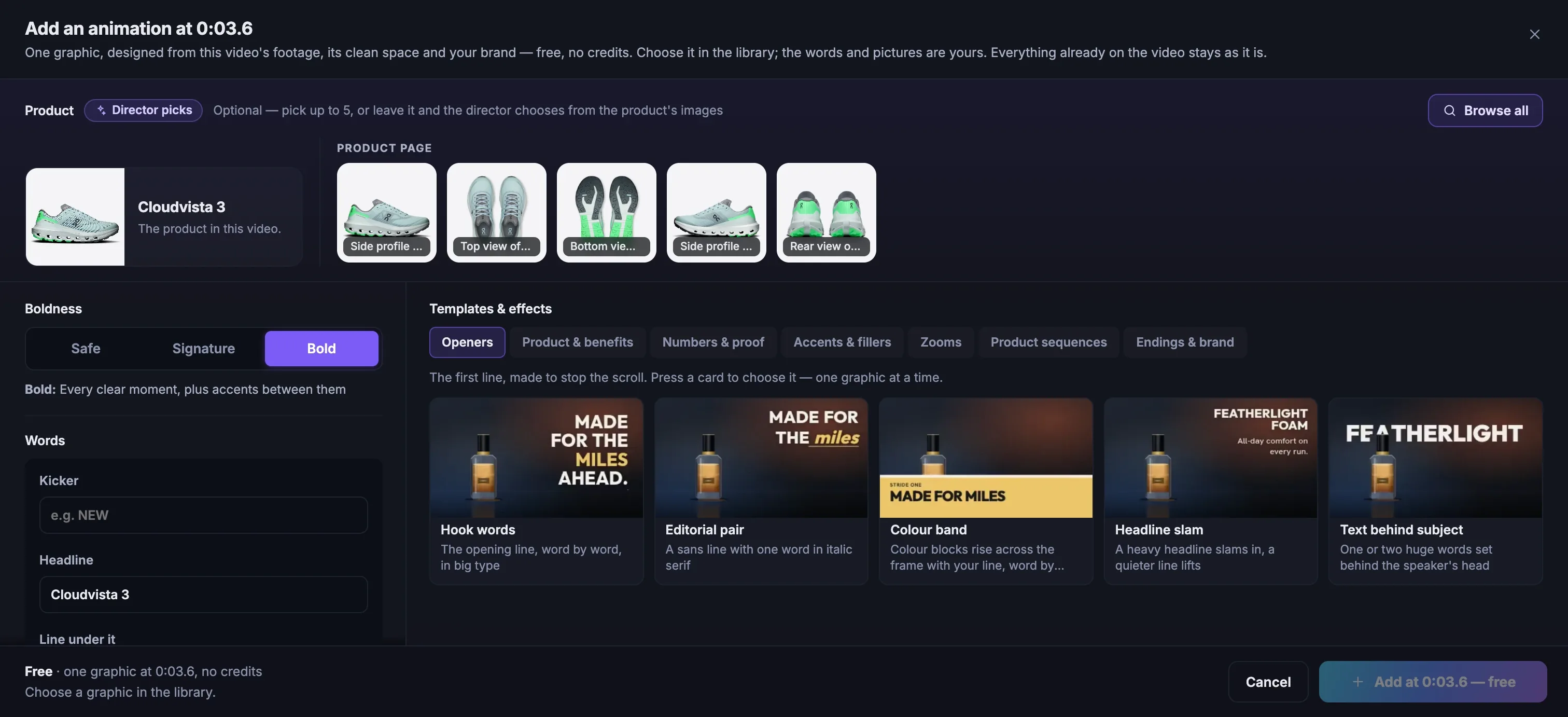
Stop at the moment
Click the timeline where you want the graphic to start, then press
+ Add animationat the top of the list.Pick the pictures, or don't
Your product page's own pictures sit across the top. Choose up to five, or leave
Director pickson and the studio will choose for you.Write the words
Set the Boldness, then fill in the kicker, the headline and the line under it. The headline starts as your product's name, and every word is yours to change.
Choose a graphic, and add it
Press a card in the library, then
Add at … — free. The studio finds the clear space in that shot, designs the graphic in your brand and drops it in.
What's in the library
The library is sorted by the job a graphic does, not by how it looks. Here's what you'll find.
| Family | What it's for | You'll find |
|---|---|---|
| Openers | The first line, made to stop the scroll | Hook words, Editorial pair, Colour band, Headline slam, Text behind subject |
| Product & benefits | What it is and why it matters | Callout, Feature list, Product panel, Pointer |
| Numbers & proof | Stats, counts and proof points | Stat, Chip row, Counter, Stamp |
| Accents & fillers | Beats, energy and quiet stretches | Kinetic word, Product insert, Product beat, Cursor card, Colour side panel |
| Zooms | The camera moves in, on the word at the playhead | Slow push-in, Punch-in zoom, Snap zoom, Step zoom |
| Product sequences | Your product shots, animated full screen | Card stack, Spotlight carousel, Grid build |
| Endings & brand | The call to action and the logo | CTA handoff, Panel CTA, Logo lockup, Typed field, Logo fold |
Camera moves, after the shoot
Zooms are the surprise in the library. They don't sit on top of the film. They move it. A slow push-in drifts closer while someone talks. A punch-in lands on the word that matters. A snap zoom hits hard and holds. A step zoom punches in, then steps in once more. Because each one is timed to a spoken word, it feels like an editor cut it.
Colour that takes over the frame
Some of the boldest graphics are just colour. The colour band rises from the bottom of the frame and carries your line across it, word by word. The colour side panel slides in from one edge and pushes the film aside for a beat. Both use your brand's colour, so they feel like your brand talking, not a template.
Product sequences from pictures you already have
Your product page is full of good pictures: the side, the top, the sole, the details. A card stack lands them one on top of another. A spotlight carousel slides them past. A grid build pops them into a grid before one fills the screen. It's the product moment a shoot rarely has time for, made from photos you already own.
More in Motion graphics
Read enough. Make one.
Point Fotyra at your store and do exactly what this guide describes, on your own brand.